




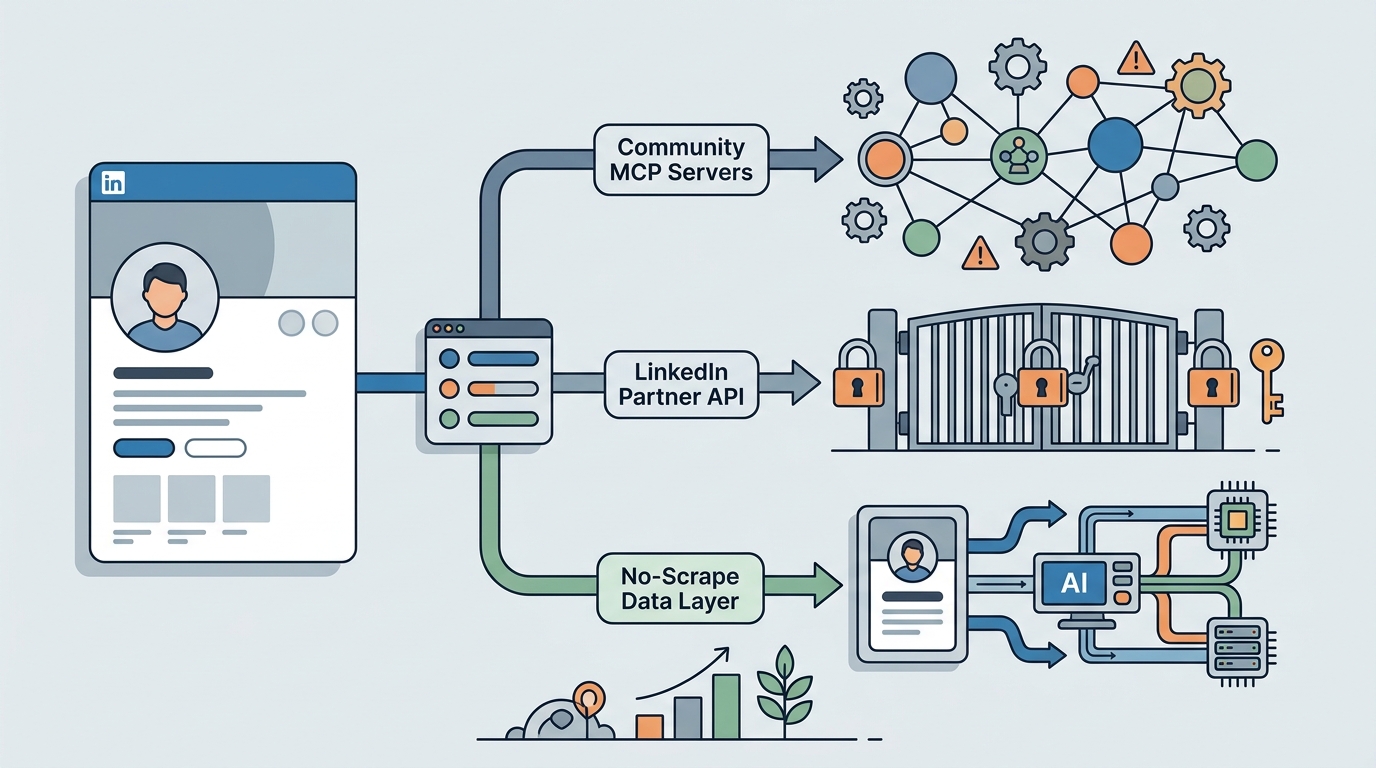
TL;DR: There is no official LinkedIn MCP. If you want an AI agent to work with LinkedIn people data, you have three real options: a community LinkedIn MCP server that drives your own logged-in session (free, but your account carries the risk), the official API (partner-gated, with no people search for third parties), or an agent-native people data layer like the Lessie Skill that searches 100+ live sources without touching your LinkedIn login. Pick by risk tolerance, volume, and whether you need verified contact data.
Search for a LinkedIn MCP and you find a dozen GitHub projects, a few hosted wrappers, and nothing from LinkedIn itself. The demand is easy to explain: agents are now doing real prospecting, recruiting, and market research, and those workflows keep hitting the same wall—the richest professional dataset on the internet sits behind a login and an API that was never opened for people search.
This guide maps the three ways developers actually wire agents to LinkedIn-grade people data in 2026, how each one works under the hood, and the trade-offs—including the account-risk questions most write-ups skip.
Does LinkedIn Have an Official MCP?
No. As of July 2026, LinkedIn does not publish, endorse, or support any MCP server. Every "LinkedIn MCP server" you can install today is community-built, and the largest projects state plainly in their own documentation that they are not affiliated with LinkedIn or Microsoft.
The gap is structural, not an oversight. LinkedIn's official developer platform has been partner-gated since 2015: meaningful API access requires applying to a partner program as an incorporated company, passing a review that takes weeks, and fitting an approved category—advertising tools, applicant tracking systems, learning platforms, marketing integrations. The self-serve endpoints that remain open return only the logged-in member's own profile data. There is no sanctioned endpoint that lets a third-party app search people or pull someone else's profile at scale, and data extraction is a use case LinkedIn's partner program explicitly rejects. An official MCP would have to expose exactly the capability the platform withholds—so it doesn't exist.
Option 1: Community LinkedIn MCP Servers
Is there a Claude MCP for LinkedIn? Yes—several. Community LinkedIn MCP servers are open-source projects that expose LinkedIn actions as MCP tools Claude or any compatible agent can call. The best-known, stickerdaniel's linkedin-mcp-server, covers profile pages, company pages, job postings, and job search. What they all share is the authentication model: your LinkedIn account is the credential.
Mechanically, these servers work one of two ways. Either you extract your li_at session cookie from a logged-in browser and pass it as an environment variable, or the server opens a browser window, lets you log in (2FA and captcha included), and stores the session locally. From then on, a browser session navigates LinkedIn as you and parses the pages it sees into structured tool results.
For personal, low-volume use—pulling a handful of profiles into Claude before a call, checking a company's open roles, researching one prospect at a time—this works, and it's free. The limitations show up the moment you lean on it:
- Your account is on the line. LinkedIn's User Agreement prohibits scraping and the use of third-party software that automates activity, and its Help Center maintains a prohibited-software policy. Enforcement is real and escalates: temporary restrictions first, permanent ones for repeated patterns. Low-volume personal use lowers the odds; it does not remove them.
- Sessions expire. The
li_atcookie typically lasts about 30 days. When it dies, your agent's LinkedIn access dies with it until you re-extract and reconfigure. - Breakage is a feature of the approach. These servers parse LinkedIn's markup. When the DOM or internal endpoints change, tools break until a maintainer patches them.
- Volume is capped by plausibility. Everything runs at the pace of one logged-in human account. And you only get what a profile page shows—no verified email addresses, no cross-source enrichment.
On the legal backdrop, the facts are narrower than either camp claims: in hiQ Labs v. LinkedIn, US courts found that scraping public pages is not "unauthorized access" under the federal CFAA—but LinkedIn ultimately prevailed on breach of contract. Scraping public data is not a crime; it is still a violation of terms you agreed to, enforced against the account you logged in with.
Option 2: The Official API Route
The official API is the fully sanctioned path—stable, documented, and almost never the answer for agent people search. Access requires the partner program: you apply as a company, wait out a multi-week review, and must fit an approved use case such as ads management, ATS integration, or marketing automation.
Even with approval, the capability you probably came for is absent. There is no people-search endpoint for third parties, no bulk profile retrieval, and profile aggregation is among the use cases LinkedIn rejects outright. If your agent's job is "find 50 heads of engineering at Series B companies and get their contact info," the official API has no endpoint for that—no matter how much paperwork you file.
The API route fits when you are building something LinkedIn wants built: posting content on a member's behalf with OAuth consent, syncing jobs from an ATS, managing ad campaigns. For people data, it is a locked door with a very polite sign.
Option 3: An Agent-Native People Data Layer (No Scraping)
The third option reframes the problem: instead of connecting your agent to LinkedIn, you connect it to a people data layer that already aggregates public professional data—LinkedIn included—from the provider's side. The Lessie Skill is built for exactly this: it runs in Claude Code, Codex, or any MCP-compatible agent, and searches 100+ live sources server-side, so no cookie, browser session, or LinkedIn account of yours is ever involved.
The toolset maps to the workflows people try to build on scraper servers, plus the parts they can't deliver:
- find_people — natural-language people search across 100+ sources (~1.9s average search).
- enrich_people — verified email addresses at 95% accuracy, the step no profile scrape can provide.
- review_people — agent-side screening of candidates against your criteria.
- find_organizations / enrich_organization — company discovery and firmographics.
- get_company_job_postings / search_company_news — hiring and news signals for timing outreach.
- web_search / web_fetch — general research inside the same skill.
This is the right pick when the workflow is sales prospecting, recruiting sourcing, or research that needs verified contact data at volume—the cases where an agent runs unattended and a personal account can't safely keep up. A community LinkedIn MCP server remains the reasonable choice for occasional personal lookups, when you specifically need your own account's view, or when the budget is zero.
The honest cons: Lessie is a commercial product—free to start, credit-based beyond that—and it requires a Lessie account. It is also people-and-company-data focused: it will not post, comment, or send connection requests for you. If end-to-end outreach is what you're after, see our guide to automated LinkedIn prospecting.
Here is how the three options compare side by side:
| Community MCP Server | Official API | Lessie Skill | |
|---|---|---|---|
| Setup | Install + extract session cookie | Partner application, weeks of review | One CLI command |
| Auth | Your li_at cookie (expires ~30 days) | OAuth + partner approval | Lessie account — no LinkedIn login |
| Data | What a profile page shows; no emails | Member's own data; no people search | 100+ sources + verified emails (95%) |
| Volume & reliability | One account's pace; breaks on DOM changes | Stable, but capability-capped | Agent-scale; ~1.9s average search |
| Risk | Against LinkedIn ToS; account restriction possible | None — fully sanctioned | No LinkedIn account involved |
| Cost | Free (open source) | Access itself is the cost | Free to start; credits for enrichment |
How to Set It Up
The no-scrape path takes about two minutes from terminal to first search. It installs as a skill via the Skills CLI and registers its tools with whatever agent you already run.
- 1Install the Lessie Skill
Run
npx skills add LessieAI/lessie-skill -y -g. This works in Claude Code, Codex, and any MCP-compatible agent—no server to host, no config file to hand-edit. - 2Sign in to Lessie
On first use, the skill walks you through connecting your Lessie account. Free to start—no credit card, and no LinkedIn credentials requested at any point.
- 3Run your first people search
Ask in plain English:
/lessie find heads of talent at Series B fintech companies. The agent calls find_people and returns matched, reviewable profiles in about two seconds. - 4Enrich to verified emails
Tell the agent to enrich your shortlist. enrich_people resolves verified email addresses at 95% accuracy—ready for your CRM, ATS, or outreach sequence.
If you're new to agent skills, our Claude Skills guide explains how skills differ from raw MCP servers, and the best Claude Skills roundup shows what else is worth installing alongside.